Monday, August 17, 2009


Friday, May 1, 2009
Exclusive Windows Mobile 6.1 ( WM6.1 ) English for HP IPAQ rx1950
Exclusive Windows Mobile 6.1 ( WM6.1 ) English for HP IPAQ rx1950
Tested and all work very well....Just read the Instruction.txt

Monday, April 13, 2009
Partition USB Stick Storage, External Hard Drive, Pen Drive For Windows
This tutorial will allow you to create partitions on any USB Stick storage or External Hard Drive
Now you can make WBFS Partition for Wii USB Loader, And other FAT36 or NTFS, and access the two partition from Windows also can copy your Wii Games from Windows too!

Access DEVICE MANAGER:
Start > Run > devmgmt.msc
Or
My Pc > Right Click > Properties > Hardware > Device Manager...
Follow the instruction by the numbers on the Picture...
Locate Your Device, From the Disk Driver !
At 6th step, Make a exactly note of the selected area, Using Notepad
Example:
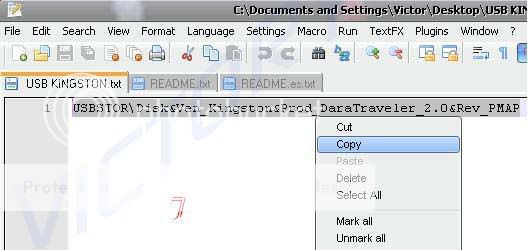
USBSTOR\Disk&Ven_Kingston&Prod_DaraTraveler_2.0&Rev_PMAP
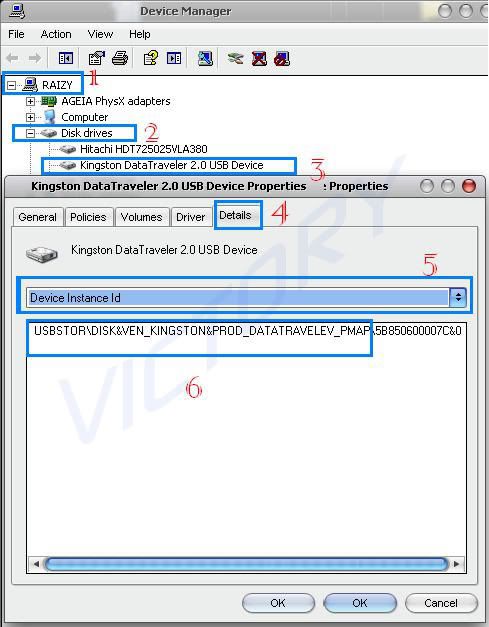 Select and copy created note, of your Device Instance ID
 Now unzip the downloaded file to your desktop and open cfadisk.inf in Notepad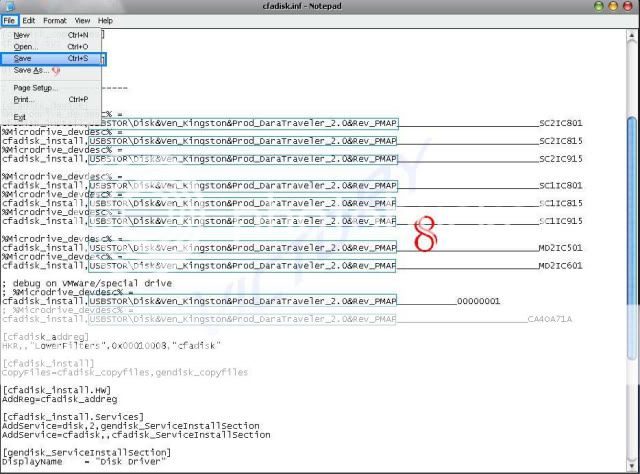
Replace all selected parts in the image, by the one you have copied from the Notepad
Then File > Save…
File > Exit…
Now Access DEVICE MANAGER:
Start > Run > devmgmt.msc
Or
My Pc > Right Click > Properties > Hardware > Device Manager...
Follow the instruction by the numbers on the Pictures...


 In this case the files are located on the Desktop
Just follow the picture


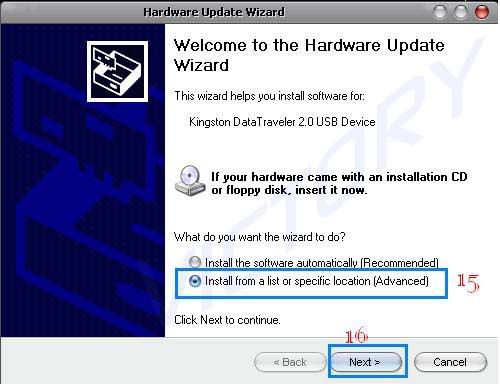
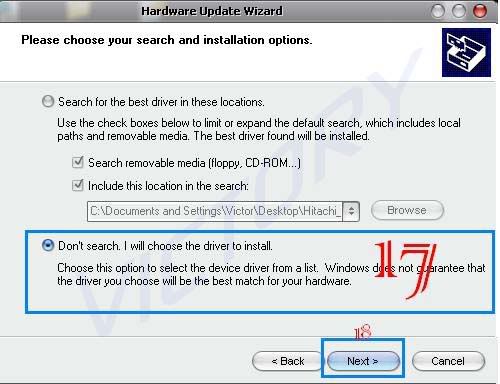
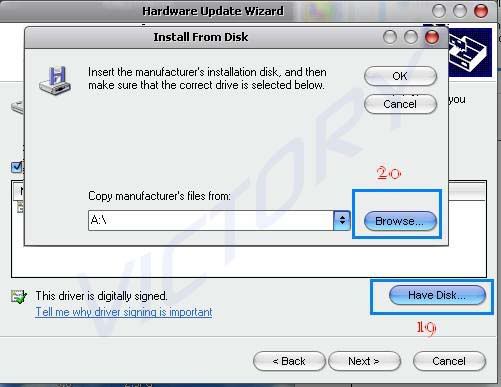
Important: when presses BROWSE, you have to locate your unzipped files
(cfadisk.inf and cfadisk.sys) And select “cfadisk.inf”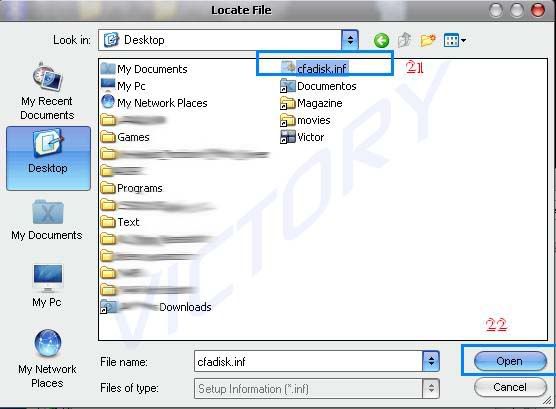 In this case the files are located on the Desktop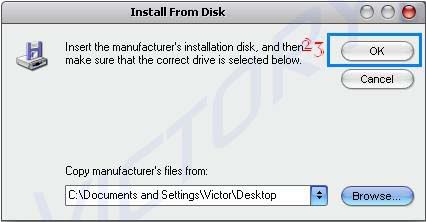
Just follow the picture
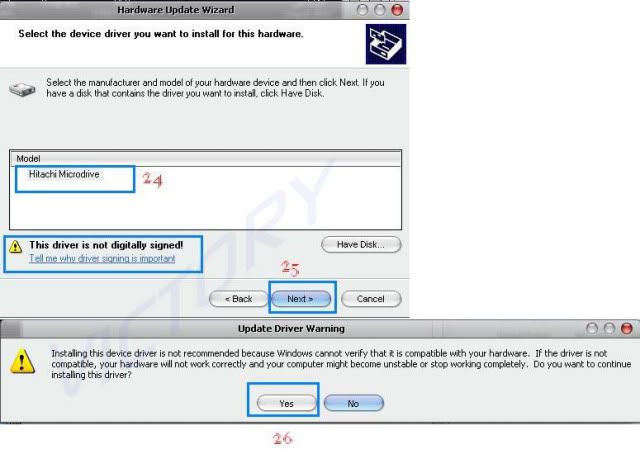
After pressing Yes, Wait a moment when the driver is being installed!
Restart the computer after the installation is recommended.
……
You are done! Congratulation!
Now you will see your USB Stick Storage as LOCAL DISK
That’s mean, you can make any number of partitions with different format too if you like (FAT 16, FAT 32, NTFS, EXT2 {Only Linux} etc…) and Windows will recognize them all, as LOCAL DISKS
If you don’t have any Partitions program, so that’s no problem
My Pc > Right Click > Manage
Storage > Disk Management
Localize your External Drive (Normally by the Label or Drive letter)
Now backup all your data on the USB Stick Storage or External Hard Drive….
(Make sure that’s the USB Stick is Selected, not the System Disk “C” or “D” normally)
Then delete partition
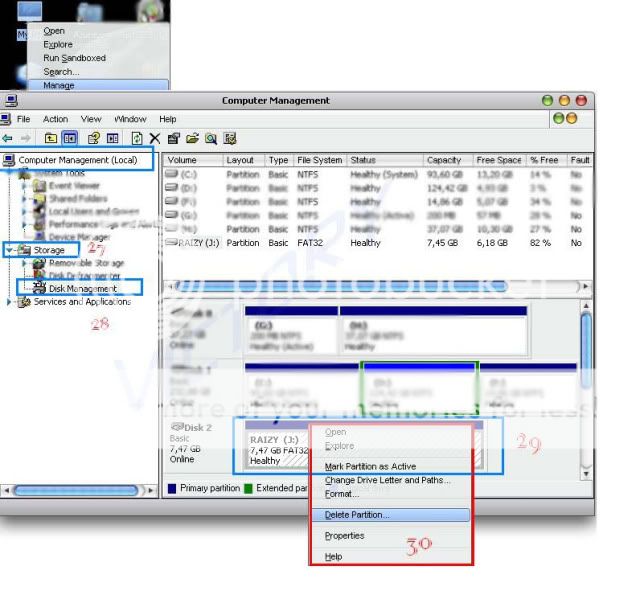
Then create partitions as you like!
2009/04/12

Monday, January 26, 2009
Subscribe to:
Posts (Atom)